


How to Handle Multiple Events with One Task in SAFERTOS®
21 May, 2026Tired of creating multiple tasks just to handle multiple events? In real-time systems, waiting on more than one condition, such as queue space and a released mutex, can quickly lead to wasted CPU cycles and bloated designs.
With the SAFERTOS® API, this is not only possible but streamlined through Event Multiplexing. This feature allows a single task to monitor multiple object events simultaneously, reducing overhead and improving responsiveness. Whether you’re dealing with queues, semaphores, mutexes, or event groups, Event Multiplexing ensures your system remains lean and predictable.
In this post, we’ll explore how Event Multiplexing works, why it matters, and how you can implement it in your SAFERTOS® applications.
Events You Can Monitor with SAFERTOS®
Object ‘events’ can be registered to the multiplex, allowing a task to monitor for said events. When one or more of the specified events occurs, the Event Multiplex will alert the task by moving it into the “ready” state.
The list of events that can be tracked are:
- Space becomes available in a queue (evtmplxQUEUE_SPACE_AVAILABLE)
- An item is placed in a queue (evtmplxQUEUE_MESSAGE_WAITING)
- A mutex is released (evtmplxMUTEX_AVAILABLE)
- A semaphore is given to (evtmplxSEMAPHORE_AVAILABLE)
- A task notification is sent (evtmplxTASK_NOTIFICATION_RECEIVED)
- An event group has its bits set (evtmplxEVENT_GROUP_BITS_SET)
Example Scenario: Handling Multiple Queues
An application is receiving data from three external sources, where each data source has packets of variable length. One approach could be to use one queue for all sources, but as a queue message must be of a singular fixed length, we would have to use a message length equal to the largest packet size – and potentially use a lot of redundant memory in the process!
Another approach could be to have 3 separate queues, one for each data source and their respective packet size. Typically, this would then require 3 separate tasks, as a task can only wait on data from one queue at a time. You know where this is going…
Instead, let’s create the 3 separate queues and use our Event Multiplex to have one task monitor all 3 simultaneously. We can even use the xQueueSendFromISR() API to have our packets sent to the queues directly from their respective interrupt service routines.
(Note: for interrupts of high frequency or messages of large size, care should be taken to perform the sends to the queue from inside the ISR as this could increase the interrupt latency.)
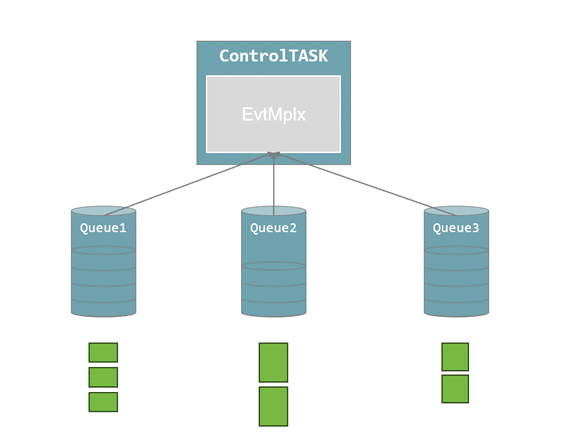
But what happens if 2 of our data interrupts tail-chain and 2 queues receive data at the same time? Will our Event Multiplex only be able to report the event of the last queue that received data? No, never fear! When waiting on events with an Event Multiplex, an array holds all the possible events that occurred before the control task was able to run.
So how would we use the SAFERTOS® API to build this example? Below is some highly simplified pseudo-code.
def vControlTask:
	QueueCreate( Q1, Q2, Q3 )
	EvtMplxCreate( EM1 )

	EvtMplxRegisterEvents( EM1,
					{
					     { Q1, MsgAvailable },
					     { Q2, MsgAvailable },
					     { Q3, MsgAvailable }
					} )

	for( ;; )
	   EvtMplxWait( EM1, Events[], TicksToWait )

        for e in Events:
			match e:
				case Q1:
					QueueReceive( Q1 )
				case Q2:
					QueueReceive( Q2 )
				case Q3:
					QueueReceive( Q3 )


def Isr1:
	QueueSend( Q1 )

def Isr2:
	QueueSend( Q2 )

def Isr3:
	QueueSend( Q3 )
Want to learn more? Download our SAFERTOS® Event Multiplexing app note.
Implementation Steps
- Create our Queues
- Create our Event Multiplex
- Register our Queues AND the type of event (a message being available) to the Event Multiplex
- Wait on our Event Multiplex
- Read data from the Queues according to the occurred events
These steps can be applied to all the other possible events listed above (although the method of passing the Events[] array would naturally be a bit more complex).
SAFERTOS® API for Event Multiplexing
Using this example, let’s take a closer look into the API. First let’s look at the method to create an Event Multiplex:
xEvtMplxCreateKrnl( portInt8Type *pcEvtMplxMemoryBuffer,
                    portUnsignedBaseType uxBufferLengthInBytes,
                    portUnsignedBaseType uxMaximumRegisteredObjectEvents,
                    portTaskHandleType xOwnerTaskHandle,
                    evtMplxHandleType *pxEvtMplxHandle )
Key Parameters Explained
- pcEvtMplxMemoryBuffer
- This is a pointer to the memory which will hold the Event Multiplex control block. This is dimensioned by…
- uxBufferLengthInBytes
- The size of the Event Multiplex buffer. This can be a little tricky to calculate, but we can use a simple formula to do so.
- uxMaximumRegisteredObjectEvents
- The maximum number of events to be registered to the Event Multiplex. In our example, we are registering 3 “MsgAvailable” events, so our value would be 3*.
- xOwnerTaskHandle
- The handle of the task taking ownership of the Event Multiplex. Note this must be a valid handle, and so our task must always be created before we attempt to create its Event Multiplex
- pxEvtMplxHandle
- A pointer to memory into which our new Event Multiplex handle will be written into.
*Note that this value refers to the number of object events, NOT the number of objects; there is a subtle difference between the two. Imagine that instead of just registering the event “MsgAvailable” for each queue, we also wanted to register “SpaceAvailable”. We have 6 object events and 3 objects. As such, uxMaximumRegisteredObjectEvents would be 6.
Buffer Size Calculation
To calculate the required size of our Event Multiplex buffer, we can use this formula:
BufSize = sizeof( evtMplxType ) + ( uxMaximumRegisteredObjectEvents * sizeof( evtMplxObjectEventControlType ) )
Fortunately, SAFERTOS® already provides an available macro to do this calculation:
evtmplxGET_REQUIRED_CREATE_BUFFER_SIZE( uxMaximumRegisteredObjectEvents )
Registering Object Events
Next let’s look at registering object events to our Event Multiplex:
xEvtMplxAddObjectEventsKrnl( evtMplxHandleType xEvtMplxHandle,
                             void *pvTargetObjectHandle,
                             portUnsignedBaseType uxEvents )
- xEvtMplxHandle
- The handle of the Event Multiplex, which events will be registered to.
- pvTargetObjectHandle
- The handle of the object which will generate the event. Again this must be a valid handle and therefore the object must have been created.
- uxEvents
- The type of event to be registered*.
*It’s worth noting that while uxEvents could be a bit mask of multiple events, it only makes sense to register one event per object. Unless you want to trigger the event multiplex every time a queue sends OR receives a message.
You may have noticed that we haven’t specified which task we want to notify on this particular event. Importantly, as an Event Multiplex is only owned by one task, that is the only task that can be notified.
De-Registering or Modifying Events
We can also de-register events for a given object:
xEvtMplxRemoveObjectEventsKrnl( evtMplxHandleType xEvtMplxHandle,
                                const void *pvTargetObjectHandle )
Or modify the events for a given object:
xEvtMplxModifyObjectEventsKrnl( evtMplxHandleType xEvtMplxHandle,
                                const void *pvTargetObjectHandle,
                                portUnsignedBaseType uxEvents )
Waiting on Events
Last but certainly not least, let’s examine how a task would wait on an Event Multiplex:
xEvtMplxWaitKrnl( evtMplxHandleType xEvtMplxHandle,
                  evtMplxObjectEventsType axObjectEvents[],
                  portUnsignedBaseType uxObjectEventsArraySize,
                  portUnsignedBaseType *puxNumberOfObjectEvents,
                  portTickType xTicksToWait )
- xEvtMplxHandle
- The handle of the Event Multiplex to wait on.
- axObjectEvents[]
- An area of memory into which the events occurring during the wait period will be written.
- uxObjectEventsArraySize
- Its C, so we must define the size of the above array.
- puxNumberOfObjectEvents
- We can provide a pointer to obtain the number of events which occurred during the wait period
- xTicksToWait
- Finally, the duration the task should wait for.
Using our pseudo-code example, the correct implementation of xEvtMplxWait() would be:
evtMplxObjectEventsType Events[ 3 ];
portUnsignedBaseType uxNumEvents;

xEvtMplxWaitKrnl( EM1,
                  Events
                  3,
                  &uxNumEvents,
                  0xFFFFFFFF );

For( int I = 0; I < uxNumEvents; I++ )
{
    xQueueReceive( Events[ I ].pvObjectHandle ); // This Rx() call has been simplified!
}
In this way we can simply handle data being transferred from 3 sources with only one task, with minimal CPU effort.
Event Multiplexing is a powerful tool for embedded developers looking to simplify task management and optimize system performance. By allowing a single task to wait on multiple events, you reduce complexity, save memory, and maintain deterministic behaviour.
Want more insights like this?
Explore our RTOS Knowledge Base for tutorials and best practices. Or subscribe to our newsletter for expert insights and updates straight to your inbox.
Author
Jonny Slim, Senior Software Engineer
Back to News